
Your best friend for file transfer.
 Fetch
Fetch
 Fetch Help > Windows > New Shortcut/Edit Shortcut Dialog Introduction
The New Shortcut/Edit Shortcut dialog lets you create a shortcut, or change the shortcut's information.
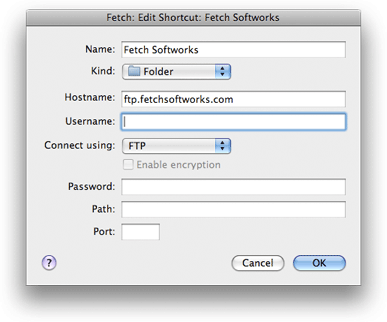
Choosing the New Shortcut or Edit Shortcut command shows this dialog. The dialog will be filled out for you if you selected a file in a file list and chose New Shortcut, or if you chose Edit Shortcut to modify an existing shortcut.
Newly created shortcuts are placed in the Fetch Shortcuts window, unless a different shortcut list window is active.
The important fields in the dialog are:
Name - A name for the shortcut, so you can identify it later.
Kind - Whether this shortcut refers to a file or a folder.
Hostname - The Internet address of the server the shortcut will access, for example "ftp.fetchsoftworks.com".
Username - The username of the account the shortcut should use.
Connect using - The type of connection you want to use to access the server (usually FTP or SFTP). Not all servers support all these choices.
Password - The password for the account needed to access the shortcut, if necessary. If you enter a password, it will be saved in your keychain for future use. If you have previously saved the password for this account in your keychain, you don't need to fill out this field.
Path - The location of the file or folder on the server, if desired. If left blank, the shortcut will take you to your home folder on the server.
The name and hostname fields must be filled out. The rest may be left blank if appropriate; for instance, you do not need a username or password for anonymous FTP servers.
The dialog supports smart pasting of Fetch addresses (FTP URLs). If you paste a Fetch address, it will be broken into parts and the parts placed in the appropriate fields.
For more information about using the New Shortcut/Edit Shortcut dialog and its contents, see the New Shortcut/Edit Shortcut dialog in-depth help topic.